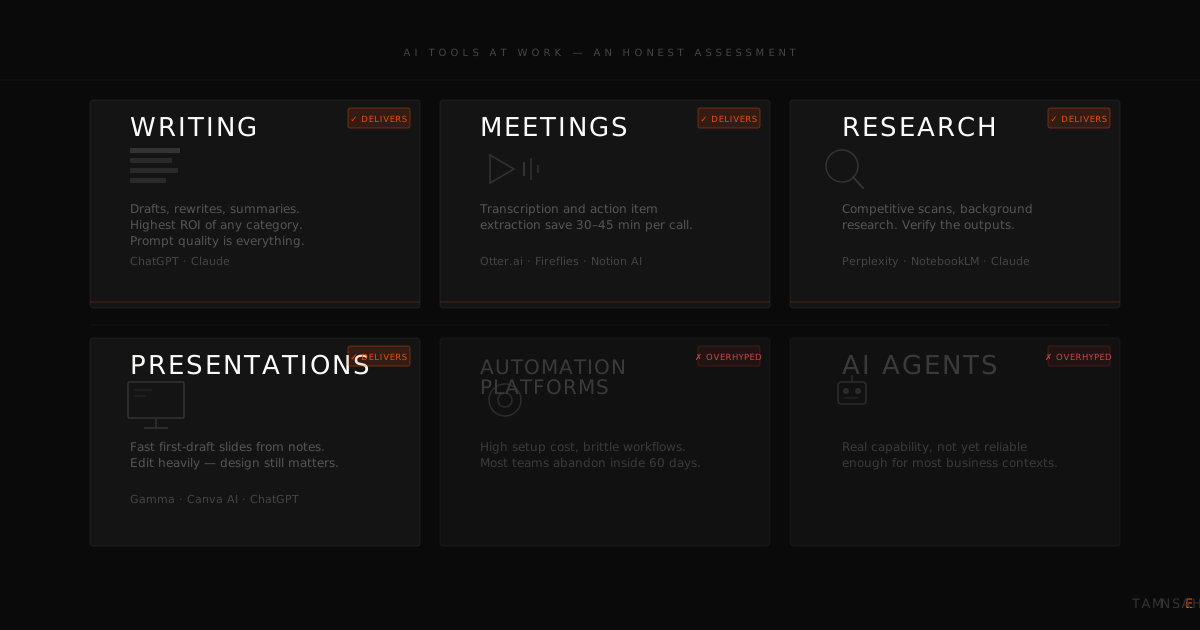
Every few weeks, a new AI tool trends online. Someone posts a video demonstrating something remarkable, the comments fill up with "game changer" and "this is insane," and by the end of the week, your inbox has three messages from colleagues asking whether the company should start using it.
Most of those tools are not game changers. Some are genuinely useful. A few are impressive in a three-minute video and useless in a real workday. The difference between the two categories is almost never obvious from a demonstration.
This article is not a list of every AI tool worth knowing about. It is something more useful: an honest account of which tools are actually producing time savings for business teams, which ones keep getting abandoned after the first week, and the one factor that determines whether any tool sticks at all.
Why the tool list keeps growing but the results stay mixed
There is a pattern that plays out in organisations that are serious about AI adoption. They identify a tool, invest in subscriptions, run a demonstration, and watch adoption trail off within a month. Then they identify another tool. The cycle repeats.
The problem is not the tools. The problem is the assumption that the tool is the solution.
A useful AI tool reduces the time or mental load required to complete a specific task. That sounds obvious, but it has a significant implication: the tool has to fit the actual task. A writing assistant is only valuable if the person using it spends meaningful time writing. A meeting summariser is only valuable if meetings produce notes that need to be acted on. When organisations adopt tools before mapping them to specific workflow friction points, they get low adoption rates and no clear return on the investment.
The second pattern worth naming is tool overload. Teams that adopt four or five AI tools simultaneously, each with its own interface, subscription, and learning curve, tend to use none of them well. The cognitive overhead of managing multiple new tools often exceeds the time saved by any one of them. One tool used consistently produces more value than five tools used occasionally.
Start narrow. Get one tool embedded into one workflow before reaching for the next.
The tools worth your team's time
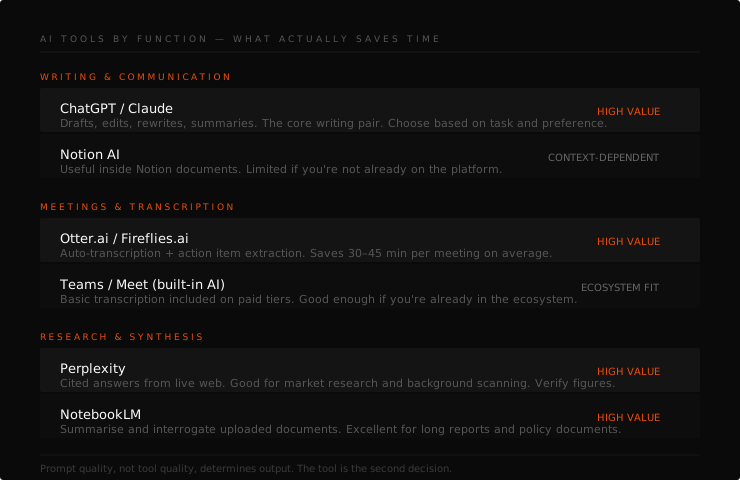
The following breakdown is organised by function, not by popularity. The tools listed here consistently produce results in business environments with non-technical teams. The assessments are based on what actually gets used after an initial training session, not what generates the most excitement during a demonstration.
For writing and communication
ChatGPT remains the most versatile starting point for most teams. It handles a broad range of writing tasks: drafting emails, summarising documents, rewriting in a different tone, generating first drafts from bullet points, and producing structured reports from rough notes. For teams that are new to AI tools, ChatGPT is the right entry point because it is conversational, forgiving of vague instructions, and produces something useful even when the prompt is not well structured.
Claude (built by Anthropic) is consistently the better choice for longer, more nuanced writing. It handles multi-page documents without losing coherence, it is more careful about making things up, and it is noticeably better at writing in a specific voice or following detailed instructions. For executive communications, proposals, policy documents, and anything where tone matters as much as content, Claude tends to outperform ChatGPT. It is worth having both, but if your team can only start with one, Claude is the stronger choice for professional writing-heavy roles.
For meetings and documentation
Otter.ai and Fireflies.ai both transcribe meetings in real time and generate summaries, action items, and key points automatically. For teams that run frequent client meetings or internal reviews, the time savings on documentation alone justify the subscription. The transcriptions are not always perfect, particularly in rooms with multiple speakers or strong accents, but the output is accurate enough to draft from. The editing time is a fraction of the time it would take to write the notes from scratch.
Notion AI is worth mentioning here for teams already using Notion. The AI layer sits inside your existing workspace, which means it can summarise pages, draft new content, and generate action lists from meeting notes without requiring a new tool or a new workflow. If Notion is already part of how your team works, the AI features are a straightforward upgrade rather than an adoption challenge.
For research and summarisation
Perplexity AI is the most useful AI research tool currently available for business purposes, and it is significantly underused. Unlike ChatGPT, Perplexity cites its sources inline. Every claim links back to where it came from. For teams that need to stay current on industry developments, prepare briefings, or research competitors, the citation model means the output is verifiable rather than requiring a separate fact-check. It also handles follow-up questions well, making it closer to a research conversation than a one-shot query.
NotebookLM (from Google) takes a different approach: you upload your own documents, reports, or transcripts, and it becomes an AI that only answers questions based on what you uploaded. For teams managing large volumes of internal documentation, client contracts, or research reports, this is genuinely useful. It reduces the time spent searching through files for specific information and can surface patterns across documents that would take hours to find manually.
For presentations and visuals
Gamma is the most practically useful AI presentation tool for non-designers. You give it a topic, a set of points, or a document, and it produces a structured, visually coherent presentation within seconds. The output is not always ready to send to a client as-is, but it produces a working draft in the time it would take to open PowerPoint and set up a template. For internal presentations, team briefings, and first-draft decks, it saves meaningful time.
Canva AI is valuable for teams that produce regular visual content but do not have a designer. The AI features within Canva, particularly the background removal, image generation, and text-to-design tools, handle the tasks that previously required either design software expertise or a freelancer brief. For social media content, event materials, and branded documents, the capability is now accessible to anyone who can describe what they want in plain language.
For HR and people teams
The most time-consuming writing tasks in HR, including job descriptions, interview question sets, performance review language, policy sections, and employee communications, are exactly the tasks that AI handles well. Neither ChatGPT nor Claude requires a specialist HR tool. The standard models, given a clear brief about the role, the competency framework, and the organisation's tone, can produce a usable first draft in seconds.
The important distinction here is that AI produces a draft, not a decision. A job description generated by AI still needs to be reviewed for accuracy, bias, and alignment with the actual role. The time savings come from not starting with a blank page, not from removing the human review step.
For customer-facing teams
Sales and client services teams can use AI to prepare for meetings, draft follow-up emails, summarise CRM notes before calls, and generate objection-handling talking points. ChatGPT and Claude both handle these tasks well when given enough context. The key constraint for customer-facing use is data sensitivity: any customer information included in an AI prompt is being sent to an external server. Teams need a clear policy on what can and cannot be included before AI is used in client-facing workflows.
The tools that consistently disappoint
Complex automation platforms such as Zapier AI and Make (formerly Integromat) are powerful in the right hands but require technical setup that most business teams are not positioned to manage independently. The promise of automated workflows sounds transformative. The reality, for teams without a dedicated operations or IT resource, is usually a partially built automation that breaks when something upstream changes and nobody knows how to fix it.
AI image generators (Midjourney, DALL-E, Adobe Firefly) produce visually impressive results and have real applications in creative and marketing work. For most business teams running workshops, reports, and client presentations, they are a curiosity rather than a productivity tool. The time investment in learning to prompt image generators effectively is better spent elsewhere for non-creative roles.
AI "agents" that promise to run complex multi-step tasks autonomously are genuinely interesting and improving rapidly. They are also not reliable enough for most business contexts right now. The category is worth watching closely. It is not worth building your team's workflows around in the near term.
The one habit that determines whether any tool sticks
After running workshops with teams across a range of industries, the pattern is consistent: the tool almost never determines the outcome. The prompt does.
Two people using the same tool on the same task will get dramatically different results if one person knows how to give a clear, specific, well-contextualised instruction and the other does not. The team member who types "write an email about the project" will get a generic email that they then spend twenty minutes fixing. The team member who types "write a professional email to a client who has missed a payment deadline. Tone should be firm but professional. Keep it under 150 words. Do not apologise." will get something close to what they would have written themselves, in seconds.
This is why tool selection, while important, is a secondary conversation. The primary conversation is about how to communicate with AI clearly. That skill transfers across every tool on this list and every tool that will be released next year. Teams that invest in learning how to prompt AI well will extract more value from a free account than teams using expensive subscriptions without that foundation.
How to choose the right tools for your specific team
The most useful question to ask before adopting any AI tool is not "what can this do?" It is "which tasks in our current workflow take the most time and produce the least unique value?" AI belongs in the gap between those two answers.
Map the repetitive, writing-heavy, research-intensive, or documentation-dependent tasks in your team's day. Then match a tool to the task, not the other way around. Start with one. Build the habit. Measure the time savings. Then consider the next one.
A workshop session built around your team's actual workflows, rather than a generic tool demonstration, compresses this process significantly. Your team leaves knowing which two or three tools apply to their specific roles and how to use them effectively from day one.
Ready to move from reading about AI to your team actually using it?
See Training Formats & Pricing