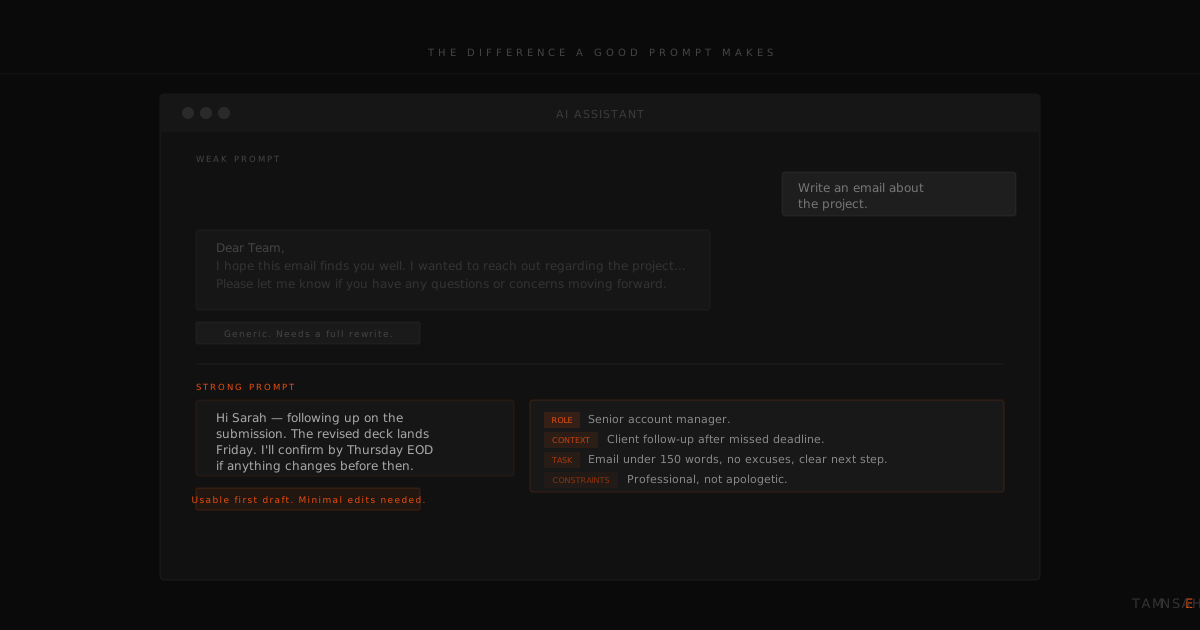
The most common complaint from people who try AI tools at work and give up is some version of the same thing: "The output was generic and I had to rewrite the whole thing anyway."
That experience is almost never caused by the tool. It is caused by the instruction.
AI language models are not thinking about your situation. They are pattern-matching against everything they have been trained on and producing the most statistically reasonable response to whatever you typed. If you type something vague, you get something generic. If you type something specific and well-structured, you get something specific and well-structured. The relationship between input and output is more direct than most people realise when they first start using these tools.
Prompt writing is the skill that determines how much value you extract from any AI tool. It transfers across ChatGPT, Claude, Gemini, Perplexity, and every model that will be released in the next few years. An hour spent understanding how to write a good prompt is worth more than a subscription to a more expensive tool.
This article covers the framework, the common mistakes, and the specific prompts that work across the business tasks that take up most of the working week.
Why your AI results feel generic
Most people write prompts the way they would type a search query. Short, noun-heavy, without context. "Write a client email." "Summarise this report." "Create a job description for a finance manager."
A search engine takes a short query and retrieves something that already exists. An AI model takes a short query and generates something new based on average patterns in its training data. That distinction matters because the average client email, the average report summary, and the average job description are exactly what you get when you provide no context. The AI has no way of knowing that your client is a particular type of person, that your report has a specific audience, or that your finance manager role has unusual requirements. It fills the gaps with assumptions, and the assumptions are always generic.
The fix is not to find a better tool. The fix is to stop leaving gaps.
The four elements of a prompt that works
A well-structured business prompt has four components. Not every prompt needs all four, but the more of them you include, the closer the output will be to what you actually need.
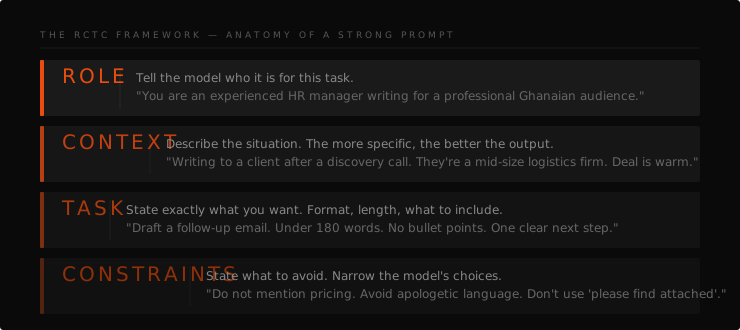
Role tells the AI who it is in this context. Not who you are, but what perspective it should write from. "You are an experienced HR manager" produces different output than "You are an executive assistant" or "You are a financial analyst." Assigning a role activates a different register of language, a different set of assumptions about the audience, and a different level of formality. It is the fastest single improvement most people can make to their prompts.
Context provides the situation. Who is the audience? What do they already know? What is the relationship between the writer and the reader? What happened before this document? A client email written to a new prospect reads differently from one written to a client you have worked with for two years. The AI cannot know which one you mean unless you tell it.
Task specifies exactly what you want, including the format and the length. "Write an email" is a task. "Write a professional follow-up email, no longer than 180 words, using short paragraphs and no bullet points" is a better task. The format instruction is often the most overlooked part. AI models have a tendency to use bullet points for everything unless told otherwise. If you want prose, say so. If you want a numbered list, say so. If you want the output in a table, describe the columns.
Constraints define the boundaries. What should the output not include? What tone should it avoid? What information should it leave out? Constraints are particularly useful for sensitive communications, for documents with compliance requirements, and for any output that will be reviewed by someone who has strong opinions about what does not belong in a piece of writing.
A prompt that includes all four elements might take sixty seconds longer to write than a one-line query. The difference in output quality is typically significant enough that the total time, including editing, is shorter.
Before and after: prompts that actually work
The following examples show the same task approached with a weak prompt and a structured one. The before versions are representative of how most people start. The after versions are the kind of prompts that produce usable first drafts.
Drafting a follow-up email
Before: "Write an email following up on a meeting."
After: "You are a business consultant. Write a professional follow-up email to the HR Director of a mid-sized company after a 45-minute discovery call. Points to cover: thank them for their time, confirm the next steps we agreed (they will share their team structure document by Friday, and we will schedule a follow-up call in the week of June 9), and include a single sentence expressing that you are looking forward to the next conversation. Tone: warm and professional, not salesy. Length: under 200 words. No bullet points."
The first prompt produces something. The second prompt produces something you could send.
Summarising a long document
Before: "Summarise this report."
After: "Read the following report and produce an executive summary in three paragraphs. Paragraph one: the central finding in two to three sentences. Paragraph two: the three most important supporting points. Paragraph three: the recommended next steps in plain language. Write for a CEO who has two minutes to read this and no background in the subject area. Avoid technical jargon. Total length: under 250 words."
The structured version produces a summary shaped for a specific reader, in a specific format, at a specific length. Those constraints eliminate most of the editing work.
Writing a job description
Before: "Write a job description for a finance manager."
After: "You are an experienced HR professional. Write a job description for a Finance Manager role at a mid-sized professional services firm in Accra, Ghana. The role reports to the CFO and oversees a team of three. Key responsibilities include financial reporting, budget management, and regulatory compliance. Required qualifications: degree in finance or accounting, five or more years of experience, and proficiency in QuickBooks. The company values directness and practical thinking over formal credentials. Tone: professional but not stiff. Format: section headers for Overview, Key Responsibilities, What We Are Looking For, and What We Offer. Length: 400 to 500 words."
This prompt produces a first draft specific enough that the editing time is minimal.
Preparing for a client meeting
Before: "Help me prepare for a client meeting."
After: "You are a senior consultant preparing for a first meeting with a new client. The client is the CEO of a 60-person HR consulting firm. They are interested in AI training for their team but have not committed yet. Their main concern, based on previous conversations, is that AI tools will be too complex for their non-technical staff. Generate five discovery questions that would help me understand their current workflows, the specific tasks where they experience the most repetition, and what success would look like for them after a training programme. Also suggest two or three things I should mention about our training approach that would address the complexity concern directly."
That prompt produces a meeting preparation document in thirty seconds that would have taken twenty minutes to think through and write.
The mistakes that produce bad output
Being too vague. Any prompt that could apply to any business in any industry will produce output that could apply to any business in any industry. Specificity is the mechanism that makes AI output useful rather than generic.
Asking for too many things in one prompt. "Write a report, then create a summary, then suggest follow-up actions, then draft an email to share it with the team." Each of those is a separate task. Breaking them into separate prompts produces better output on each one. The AI is not slower for doing one thing at a time. You are the bottleneck if you try to get everything in a single output.
Not specifying the audience. The appropriate register for an internal team update is different from the register for a board report, which is different again from the register for a client communication. The AI will default to something middle-of-the-road unless you define the audience clearly. A sentence like "this is for a CEO who is not familiar with the technical details" changes the entire output.
Accepting the first draft without iteration. AI output is a starting point, not a final product. If the first output is not quite right, the most efficient move is to tell the AI specifically what to adjust rather than starting again or editing manually. "Make the tone more direct." "Shorten the third paragraph." "Replace the bullet points with prose." These are faster instructions than rewriting the section yourself.
Building a prompt library your team actually uses
A prompt library is a document where your team stores the prompts that have produced the best results for the tasks you repeat most often. It does not need to be complicated. A shared document with sections organised by task type, email drafts, report summaries, client communications, research questions, is enough.
The value of a prompt library compounds over time. Once someone on your team has spent twenty minutes finding the right prompt structure for a weekly report, that work is done. Every subsequent report takes a fraction of the time. The library also reduces the learning curve for new team members, who can start producing useful AI output from day one rather than spending weeks figuring out what works.
The most common reason prompt libraries do not get used is that they are built once and never updated. Treat a prompt library as a living document. When someone finds a prompt that works significantly better than the existing version, it gets updated. When a new task category becomes common, it gets added. The library is only useful if it reflects how your team actually works right now.
Where to go from here
The framework in this article, Role, Context, Task, Constraints, is where every TAMENSAH workshop begins. Not with a tool demo. Not with a features overview. With a practical session where participants write prompts for their own tasks, see the difference between a weak prompt and a structured one, and leave with a working prompt library built around their specific role.
The shift from "AI gives me generic results" to "AI saves me an hour every day" is almost always a prompting shift, not a tool switch.
Ready to move from reading about AI to your team actually using it?
See Training Formats & Pricing